 Microsoft Excel has a
tendency to display number format based columns with no prefix of ZEROs. For
example, if there is a value ’007′ excel displays it as ’7′, excel display it
as ’007′ only if the column is set in text format. You can see the difference
in the below screenshot
Microsoft Excel has a
tendency to display number format based columns with no prefix of ZEROs. For
example, if there is a value ’007′ excel displays it as ’7′, excel display it
as ’007′ only if the column is set in text format. You can see the difference
in the below screenshot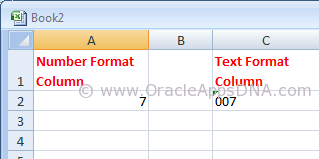
Please go through the
below URL for an example to generate an XMLP report:
In the example mentioned
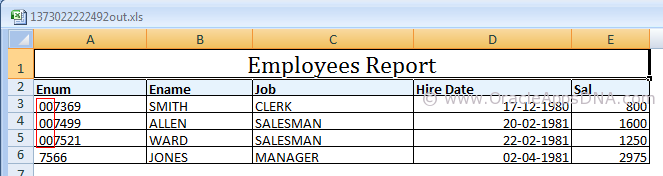
in the above URL you could see the output as shown in the below screenshot
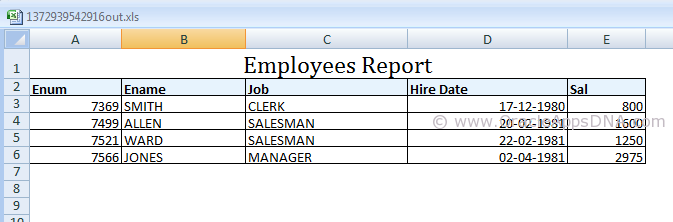
But if you observe the
data in the emp table, you could see three rows have leading zeros for employee
number(Please note, I have updated the data of
seeded emp table with prefix of 00 and also changed the data type of empno
column to varchar2(6) for the sake of example.)
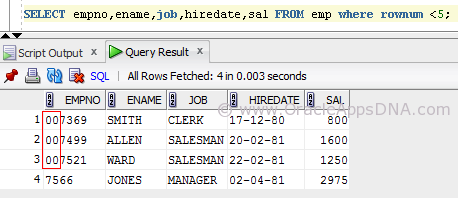
As the output is of
excel type the empno column is considered as Number column (as the entire
column consists of number format data) and the leading zeros are removed in
display.
We have multiple ways to
resolve this, I have listed them below.
Method 1
- Open the RTF Template in MS Word.
- Go to Data -> Load XML Data.
- Once the data is loaded successfully, double click on that field.
- Under field properties window set the field formatting type as “Regular Text” and set the check box “Force LTR”.
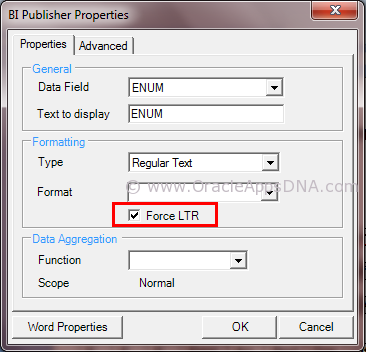
After following the
above said steps, save the template and preview the output which is as shown
below
Method 2
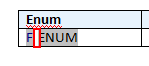
Add Ctrl+Shift+Space
after/before emplyee number on template to create a non-breaking space. The
non-breakable space converts the number column to string column
Disadvantage of this
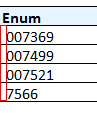
method is that the non-breakable space is visible in the output as well, you
can see in the screenshot below
Method 3
This is the best method
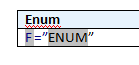
I have found, In this method we need to use an equal-to symbol before the field
and enclose the field in double quotes for example:- =”ENUM”
This works only in excel
however it will allow you to cut and paste (ie to use the value to search in
Oracle) and also to do vlookups.
The theory is that excel
will concatenate the values together because it has quotes around it, it will
treat it as a string rather than simply a value.
For any other formats
this method will not work.
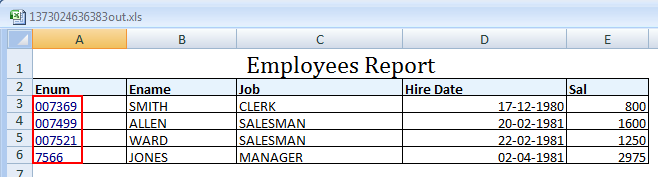
You can see in the above
screenshot that Enum column values are turned to blue color as the content is
explicit converted to text format from number format.
Hope this article is
useful for those who are in need to show leading zeros for number columns in
XMLP reports. If you have any best solution, please leave a comment and share
with the readers.
Excel
Output From BI Publisher or XML Publisher is Trimming Leading Zeros [ID
417811.1] 0xA0


No comments:
Post a Comment