Monday, 24 February 2014

Script to find Oracle API's for any module?

post signatureScript to find Oracle API's for any module:


select substr(a.OWNER,1,20)
, substr(a.NAME,1,30)
, substr(a.TYPE,1,20)
, substr(u.status,1,10) Stat
, u.last_ddl_time
, substr(text,1,80) Description
from dba_source a, dba_objects u
WHERE 2=2
and u.object_name = a.name 
and a.text like '%Header%'
and a.type = u.object_type
and a.name like 'AP_%API%' –- Checking for AP Related APIs
order by
a.owner, a.name

FOR KILLING A CONCURRENT REQUEST AND FOR KILLING A SESSION

post signatureFOR KILLING A CONCURRENT REQUEST:


UPDATE fnd_concurrent_requests
   SET phase_code = ‘C’,
       status_code = ‘X’
 WHERE request_ID = xxxx;

FOR KILLING A SESSION:
Syntax:

alter system kill session ‘<sid>,<Serial#>’;

How to submit XMLP Report using a PL/SQL Script:

post signatureHow to submitXMLP Report using a PL/SQL Script:


Generally we use FND_REQUEST.SUBMIT_REQUEST to submit a concurrent program using a PL/SQL script. But we can not attach a layout to the concurrent request using the above said API.
We can attach a layout to the concurrent request by using another procedure ADD_LAYOUT which belongs to the same package FND_REQUEST
Below is the signature of the procedure ADD_LAYOUT:
fnd_request.add_layout (
template_appl_name  => 'Template Application',
template_code       => 'Template Code',
template_language   => 'en', --Use language from template definition
template_territory  => 'US', --Use territory from template definition
output_format       => 'PDF' --Use output format from template definition
);
Note:
  1. ADD_LAYOUT procedure should be called only when there is a layout associated to a concurrent program
  2. Session context should be set using ‘FND_GLOBAL.APPS_INITIALIZE’ before calling the ADD_LAYOUT procedure
Example:
DECLARE
--
l_responsibility_id NUMBER;
l_application_id     NUMBER;
l_user_id           NUMBER;
l_request_id            NUMBER;
l_layout                NUMBER;
--
BEGIN
  --
  SELECT DISTINCT fr.responsibility_id,
    frx.application_id
     INTO l_responsibility_id,
    l_application_id
     FROM apps.fnd_responsibility frx,
    apps.fnd_responsibility_tl fr
    WHERE fr.responsibility_id = frx.responsibility_id
  AND LOWER (fr.responsibility_name) LIKE LOWER('XXTest Resp');
  --
   SELECT user_id INTO l_user_id FROM fnd_user WHERE user_name = 'STHALLAM';
  --
  --To set environment context.
  --
  apps.fnd_global.apps_initialize (l_user_id,l_responsibility_id,l_application_id);
  --
  --Setting Layout for the Request
  --
  l_layout := apps.fnd_request.add_layout(
                            template_appl_name => 'XXCUST',
                            template_code      => 'XXEMP',
                            template_language  => 'en',
                            template_territory => 'US',
                            output_format      => 'EXCEL');
  --
  --Submitting Concurrent Request
  --
  l_request_id := fnd_request.submit_request ( 
                            application   => 'XXCUST', 
                            program       => 'XXEMP', 
                            description   => 'XXTest Employee Details', 
                            start_time    => sysdate, 
                            sub_request   => FALSE,
   argument1     => 'Smith'
  );
  --
  COMMIT;
  --
  IF l_request_id = 0
  THEN
     dbms.output.put_line ('Concurrent request failed to submit');
  ELSE
     dbms_output.put_line('Successfully Submitted the Concurrent Request');
  END IF;
  --
EXCEPTION
WHEN OTHERS THEN
  dbms_output.put_line('Error While Submitting Concurrent Request '||TO_CHAR(SQLCODE)||'-'||SQLERRM);
END;
/

XMLP tables in oracle apps

XMLP tables:


Table Name
Description
XDO_CONFIG_PROPERTIES_B
Stores the XML Publisher Administration configuration properties that are accessible from the OA Framework interface.
XDO_CONFIG_PROPERTIES_TL
Translation table for XDO_CONFIG_PROPERTIES_B.
XDO_CONFIG_VALUES
Stores the values assigned to the property in Administration Configuration Data
XDO_CURRENCY_FORMATS
Stores the format masks for various currencies. A collection of these formats forms a currency format set.
XDO_CURRENCY_FORMAT_SETS_B
Stores the Currency Format Sets
XDO_CURRENCY_FORMAT_SETS_TL
Stores the Currency Format Sets
XDO_DS_DEFINITIONS_B
Stores data source definition represented by XML Schema Definition (XSD). Each data source has one or more elements, and these information are stored in XDO_DS_ELEMENTS_B
XDO_DS_DEFINITIONS_TL
Translation table for XDO_DS_DEFINITIONS_B
XDO_FONT_MAPPINGS
Stores the mappings from a base font to a target Truetype or Type 1 font. A collection of these mappings forms a font mapping set
XDO_FONT_MAPPING_SETS_B
Stores the header information for a font mapping set, which is a collection of font mappings
XDO_FONT_MAPPING_SETS_TL
Translation table for XDO_FONT_MAPPING_SETS_B
XDO_LOBS
Stores Template(RTF File), XML File, XML Schema File, locale(langauge and territory) sensitive binary and text files. It is mainly used for storing language layout templates.
XDO_TEMPLATES_B
Stores template information. Each template has a corresponding data source definition stored in the XDO_DS_DEFINITIONS_B. Each translation of a certain template, not each template, has a corresponding physical template file. The physical template file information are stored in the XDO_TEMPLATE_FILES.
XDO_TEMPLATES_TL
Translatable table for XDO_TEMPLATES_B
XDO_TEMPLATE_FIELDS
Stores information of the fields of template file. Each field belongs to one of physical template files
XDO_TRANS_UNITS
Stores the header information regarding each segment of translatable text in layout templates
XDO_TRANS_UNIT_PROPS
Stores any untranslatable values embedded within a segment of text. These values will be merged back into the text translations
XDO_TRANS_UNIT_VALUES
Stores any untranslatable values embedded within a segment of text. These values will be merged back into the text translationsd

XML/BI Publisher Template/Report Migration UNIX Scripts

post signatureXML/BI Publisher Template/Report Migration
Here are the simple steps to migrate BI Publisher Report objects ( Data Defn, Layout Template, Concurrent Programs etc ) from one instance to another instance.


  • Download Data Template/Layout template metadata defn into file .ldt
FNDLOAD apps/ apps 0 Y DOWNLOAD $XDO_TOP/patch/115/import/xdotmpl.lct <Defn_Name>.ldt XDO_DS_DEFINITIONS APPLICATION_SHORT_NAME=<Custom_Application> DATA_SOURCE_CODE=<DataDefn_Code> TMPL_APP_SHORT_NAME=<Custom_Application> TEMPLATE_CODE=<TemplateDefn_Code>
  • Download Concurrent Program defn into file .ldt
FNDLOAD apps/apps 0 Y DOWNLOAD $FND_TOP/patch/115/import/afcpprog.lct <Conc_prog_name>.ldt PROGRAM CONCURRENT_PROGRAM_NAME=<Conc_Prog_Name> APPLICATION_SHORT_NAME=<Custom_Application_Name>
  • Download the Layout template physically from the instance. Please note after the command is run successfully output will be the file stored in the current directory from where the command is run.
java oracle.apps.xdo.oa.util.XDOLoader DOWNLOAD \
-DB_USERNAME apps \
-DB_PASSWORD apps \
-JDBC_CONNECTION pra.host.com:1527:<SID> \
-LOB_TYPE TEMPLATE \
-APPS_SHORT_NAME <Custom_Application> \
-LOB_CODE <TemplateDefn_Code> \
-LANGUAGE en \
-TERRITORY US
  • Download the data template physically(If you have one) from the instance. Please note after the command is run successfully output will be the file stored in the current directory from where the command is run.
java oracle.apps.xdo.oa.util.XDOLoader DOWNLOAD \
-DB_USERNAME apps \
-DB_PASSWORD apps \
-JDBC_CONNECTION pra.host.com:1527:<SID> \
-LOB_TYPE DATA_TEMPLATE \
-APPS_SHORT_NAME <Custom_Application> \
-LOB_CODE <DataDefn_Code> \
-LANGUAGE en \
-TERRITORY US


COPY THE FILES TO THE TARGET ENV USING FTP AND THEN UPLOAD.


Uploading to an Environment
  • Upload AOL Defn of Data/Layout templates and the Concurrent program using below commands
FNDLOAD apps/ apps 0 Y UPLOAD $XDO_TOP/patch/115/import/xdotmpl.lct  <Defn_Name>.ldt
FNDLOAD apps / apps 0 Y UPLOAD $FND_TOP/patch/115/import/afcpprog.lct <Conc_prog_name>.ldt
  • Upload physical rtf template
java oracle.apps.xdo.oa.util.XDOLoader UPLOAD \
-DB_USERNAME apps \
-DB_PASSWORD apps \
-JDBC_CONNECTION pra.host.com:1527:<SID> \
-LOB_TYPE TEMPLATE \
-APPS_SHORT_NAME < Custom_Application > \
-LOB_CODE < TemplateDefn _Code> \
-LANGUAGE en \
-TERRITORY US \
-XDO_FILE_TYPE RTF \
-FILE_CONTENT_TYPE ’application/rtf’ \
-FILE_NAME <Template_File_Name>.rtf \
-NLS_LANG ENGLISH_UNITED STATES.WE8ISO8859P1
  • Upload physical Data Template if you have one.
java oracle.apps.xdo.oa.util.XDOLoader UPLOAD \
-DB_USERNAME apps \
-DB_PASSWORD apps \
-JDBC_CONNECTION pra.host.com:1527:<SID> \
-LOB_TYPE DATA_TEMPLATE \
-APPS_SHORT_NAME <Custom_Application> \
-LOB_CODE <DataDefn_Code> \
-LANGUAGE en \
-TERRITORY US \
-XDO_FILE_TYPE XML \
-FILE_NAME <DataDefn_File_Name>.xml \

How to Display Leading Zeros in XMLP Report – Excel Output

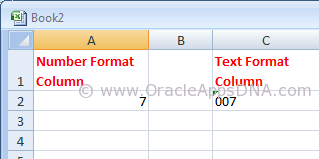
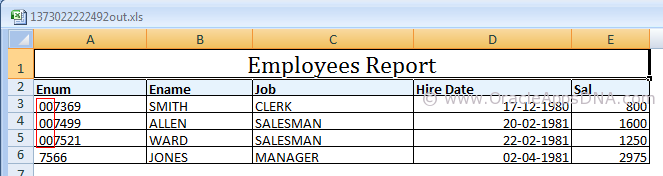
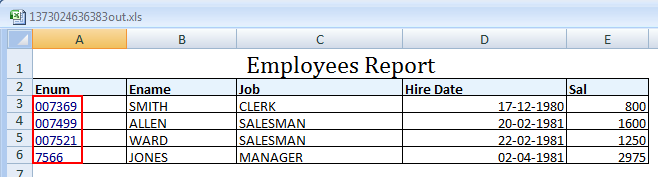
post signatureMicrosoft Excel has a tendency to display number format based columns with no prefix of ZEROs. For example, if there is a value ’007′ excel displays it as ’7′, excel display it as ’007′ only if the column is set in text format. You can see the difference in the below screenshot
String vs Number in Excel
Please go through the below URL for an example to generate an XMLP report:

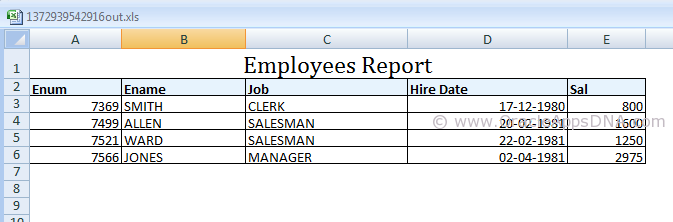
In the example mentioned in the above URL you could see the output as shown in the below screenshot
Emp Report Output
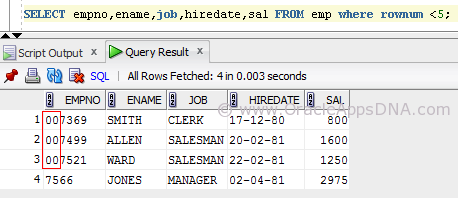
But if you observe the data in the emp table, you could see three rows have leading zeros for employee number(Please note, I have updated the data of seeded emp table with prefix of 00 and also changed the data type of empno column to varchar2(6) for the sake of example.)
EmpTable
As the output is of excel type the empno column is considered as Number column (as the entire column consists of number format data) and the leading zeros are removed in display.
We have multiple ways to resolve this, I have listed them below.
Method 1
  1. Open the RTF Template in MS Word.
  2. Go to Data -> Load XML Data.
  1. Once the data is loaded successfully, double click on that field.
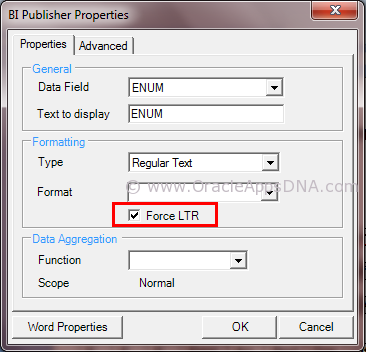
  1. Under field properties window set the field formatting type as “Regular Text” and set the check box “Force LTR”.
Force_LTR_TO_Show_Leading_Zeros_for_a_Number
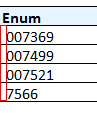
After following the above said steps, save the template and preview the output which is as shown below
Correct Output
Method 2
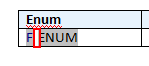
Add Ctrl+Shift+Space after/before emplyee number on template to create a non-breaking space. The non-breakable space converts the number column to string column
Emp_RPT_shift+ctrl+space
Disadvantage of this method is that the non-breakable space is visible in the output as well, you can see in the screenshot below
space in emp number
Method 3
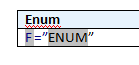
This is the best method I have found, In this method we need to use an equal-to symbol before the field and enclose the field in double quotes for example:- =”ENUM”
This works only in excel however it will allow you to cut and paste (ie to use the value to search in Oracle) and also to do vlookups.
Enum with equalto and quotes
The theory is that excel will concatenate the values together because it has quotes around it, it will treat it as a string rather than simply a value.
For any other formats this method will not work.
Final Emp Output
You can see in the above screenshot that Enum column values are turned to blue color as the content is explicit converted to text format from number format.
Hope this article is useful for those who are in need to show leading zeros for number columns in XMLP reports. If you have any best solution, please leave a comment and share with the readers.

Excel Output From BI Publisher or XML Publisher is Trimming Leading Zeros [ID 417811.1]  0xA0         

How to run Workflow Background Process from SQL*Plus? And from Unix?

post signatureHow to run Workflow Background Process from SQL*Plus?


BEGIN
  wf_engine
.background (itemtype=>NULL ,
                        process_deferred
=>TRUE ,
                        minthreshold
=>NULL ,
                        maxthreshold
=>NULL ,
                        process_timeout
=>FALSE ,
                        process_stuck
=>FALSE);
END;


How to run Workflow Background Process from Unix?

$ $FND_TOP/Admin/Sql/wfbkg.sql