Monday, 24 February 2014

XML/BI Publisher Template/Report Migration UNIX Scripts

post signatureXML/BI Publisher Template/Report Migration
Here are the simple steps to migrate BI Publisher Report objects ( Data Defn, Layout Template, Concurrent Programs etc ) from one instance to another instance.


  • Download Data Template/Layout template metadata defn into file .ldt
FNDLOAD apps/ apps 0 Y DOWNLOAD $XDO_TOP/patch/115/import/xdotmpl.lct <Defn_Name>.ldt XDO_DS_DEFINITIONS APPLICATION_SHORT_NAME=<Custom_Application> DATA_SOURCE_CODE=<DataDefn_Code> TMPL_APP_SHORT_NAME=<Custom_Application> TEMPLATE_CODE=<TemplateDefn_Code>
  • Download Concurrent Program defn into file .ldt
FNDLOAD apps/apps 0 Y DOWNLOAD $FND_TOP/patch/115/import/afcpprog.lct <Conc_prog_name>.ldt PROGRAM CONCURRENT_PROGRAM_NAME=<Conc_Prog_Name> APPLICATION_SHORT_NAME=<Custom_Application_Name>
  • Download the Layout template physically from the instance. Please note after the command is run successfully output will be the file stored in the current directory from where the command is run.
java oracle.apps.xdo.oa.util.XDOLoader DOWNLOAD \
-DB_USERNAME apps \
-DB_PASSWORD apps \
-JDBC_CONNECTION pra.host.com:1527:<SID> \
-LOB_TYPE TEMPLATE \
-APPS_SHORT_NAME <Custom_Application> \
-LOB_CODE <TemplateDefn_Code> \
-LANGUAGE en \
-TERRITORY US
  • Download the data template physically(If you have one) from the instance. Please note after the command is run successfully output will be the file stored in the current directory from where the command is run.
java oracle.apps.xdo.oa.util.XDOLoader DOWNLOAD \
-DB_USERNAME apps \
-DB_PASSWORD apps \
-JDBC_CONNECTION pra.host.com:1527:<SID> \
-LOB_TYPE DATA_TEMPLATE \
-APPS_SHORT_NAME <Custom_Application> \
-LOB_CODE <DataDefn_Code> \
-LANGUAGE en \
-TERRITORY US


COPY THE FILES TO THE TARGET ENV USING FTP AND THEN UPLOAD.


Uploading to an Environment
  • Upload AOL Defn of Data/Layout templates and the Concurrent program using below commands
FNDLOAD apps/ apps 0 Y UPLOAD $XDO_TOP/patch/115/import/xdotmpl.lct  <Defn_Name>.ldt
FNDLOAD apps / apps 0 Y UPLOAD $FND_TOP/patch/115/import/afcpprog.lct <Conc_prog_name>.ldt
  • Upload physical rtf template
java oracle.apps.xdo.oa.util.XDOLoader UPLOAD \
-DB_USERNAME apps \
-DB_PASSWORD apps \
-JDBC_CONNECTION pra.host.com:1527:<SID> \
-LOB_TYPE TEMPLATE \
-APPS_SHORT_NAME < Custom_Application > \
-LOB_CODE < TemplateDefn _Code> \
-LANGUAGE en \
-TERRITORY US \
-XDO_FILE_TYPE RTF \
-FILE_CONTENT_TYPE ’application/rtf’ \
-FILE_NAME <Template_File_Name>.rtf \
-NLS_LANG ENGLISH_UNITED STATES.WE8ISO8859P1
  • Upload physical Data Template if you have one.
java oracle.apps.xdo.oa.util.XDOLoader UPLOAD \
-DB_USERNAME apps \
-DB_PASSWORD apps \
-JDBC_CONNECTION pra.host.com:1527:<SID> \
-LOB_TYPE DATA_TEMPLATE \
-APPS_SHORT_NAME <Custom_Application> \
-LOB_CODE <DataDefn_Code> \
-LANGUAGE en \
-TERRITORY US \
-XDO_FILE_TYPE XML \
-FILE_NAME <DataDefn_File_Name>.xml \

How to Display Leading Zeros in XMLP Report – Excel Output

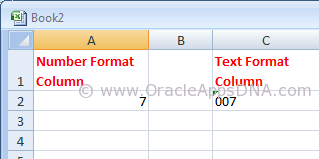
post signatureMicrosoft Excel has a tendency to display number format based columns with no prefix of ZEROs. For example, if there is a value ’007′ excel displays it as ’7′, excel display it as ’007′ only if the column is set in text format. You can see the difference in the below screenshot
String vs Number in Excel
Please go through the below URL for an example to generate an XMLP report:

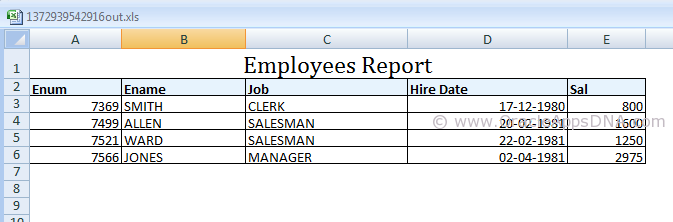
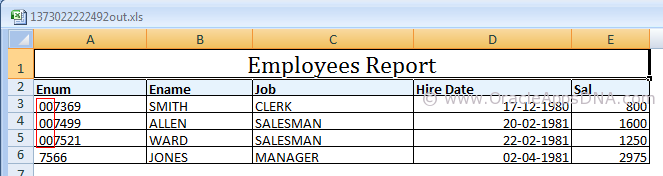
In the example mentioned in the above URL you could see the output as shown in the below screenshot
Emp Report Output
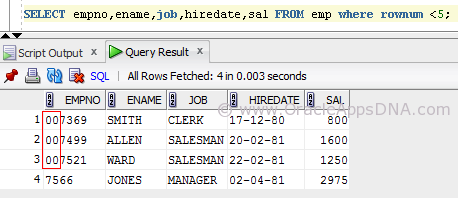
But if you observe the data in the emp table, you could see three rows have leading zeros for employee number(Please note, I have updated the data of seeded emp table with prefix of 00 and also changed the data type of empno column to varchar2(6) for the sake of example.)
EmpTable
As the output is of excel type the empno column is considered as Number column (as the entire column consists of number format data) and the leading zeros are removed in display.
We have multiple ways to resolve this, I have listed them below.
Method 1
  1. Open the RTF Template in MS Word.
  2. Go to Data -> Load XML Data.
  1. Once the data is loaded successfully, double click on that field.
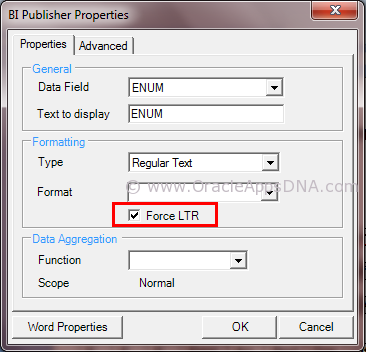
  1. Under field properties window set the field formatting type as “Regular Text” and set the check box “Force LTR”.
Force_LTR_TO_Show_Leading_Zeros_for_a_Number
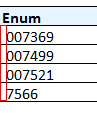
After following the above said steps, save the template and preview the output which is as shown below
Correct Output
Method 2
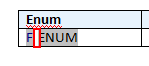
Add Ctrl+Shift+Space after/before emplyee number on template to create a non-breaking space. The non-breakable space converts the number column to string column
Emp_RPT_shift+ctrl+space
Disadvantage of this method is that the non-breakable space is visible in the output as well, you can see in the screenshot below
space in emp number
Method 3
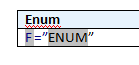
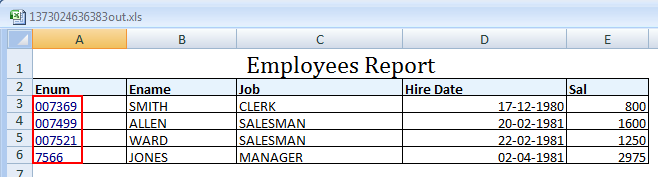
This is the best method I have found, In this method we need to use an equal-to symbol before the field and enclose the field in double quotes for example:- =”ENUM”
This works only in excel however it will allow you to cut and paste (ie to use the value to search in Oracle) and also to do vlookups.
Enum with equalto and quotes
The theory is that excel will concatenate the values together because it has quotes around it, it will treat it as a string rather than simply a value.
For any other formats this method will not work.
Final Emp Output
You can see in the above screenshot that Enum column values are turned to blue color as the content is explicit converted to text format from number format.
Hope this article is useful for those who are in need to show leading zeros for number columns in XMLP reports. If you have any best solution, please leave a comment and share with the readers.

Excel Output From BI Publisher or XML Publisher is Trimming Leading Zeros [ID 417811.1]  0xA0         

How to run Workflow Background Process from SQL*Plus? And from Unix?

post signatureHow to run Workflow Background Process from SQL*Plus?


BEGIN
  wf_engine
.background (itemtype=>NULL ,
                        process_deferred
=>TRUE ,
                        minthreshold
=>NULL ,
                        maxthreshold
=>NULL ,
                        process_timeout
=>FALSE ,
                        process_stuck
=>FALSE);
END;


How to run Workflow Background Process from Unix?

$ $FND_TOP/Admin/Sql/wfbkg.sql

Thursday, 23 January 2014

Sample shell Script to send concurrent program output an email

#!/bin/ksh


# Parameters.
#----- Standard Parameters: -----#
p_oracle_id=`echo ${1}`
USER_ID=`echo ${2}`
ORACLE_USER=`echo ${3}`
REQUEST_ID=`echo ${4}`
#----- User Parameters: -----#
P_REQUEST_ID=`echo ${5}`
 

v_requestid=$P_REQUEST_ID

echo "v_requestid: "$v_requestid

x=`sqlplus -s $p_oracle_id <<EOF
set feedback off set echo off head off pagesize 0 trimspool on linesize 1000
set heading off
spool temp.txt
SELECT  OUTFILE_NAME
FROM    fnd_concurrent_requests
WHERE   request_id   = $v_requestid;
EXIT;
spool off; 
EOF`


lv_body="Email_body.txt"
echo "Please find the attached log file for xxxx AR Oracle Outbound Interface To xxxx Data Feed." > $lv_body
echo "" >> $lv_body
echo "Please take appropriate action if this is not as expected." >> $lv_body

#mutt  $lv_out_file_path -s "$lv_new"  $TO_ADDRESS < $lv_body1
mutt -a $x -s "Oracle Outbound Interface to xxx Data feed is completed with Error/Warning status" reddi.info@gmail.com < $lv_body

rm $lv_body


--

Wednesday, 16 October 2013

Query to find the responsibility for quering supplier sites of a perticular operating unit in R12


Finding  the operating unit of a Supplier:
--------------------------------------------------------------
SELECT HZP.PARTY_NAME "VENDOR NAME",hou.name                       operating_unit
, APS.SEGMENT1 "VENDOR NUMBER"
, ASS.VENDOR_SITE_CODE "SITE CODE"
FROM HZ_PARTIES HZP
, AP_SUPPLIERS APS
, HZ_PARTY_SITES SITE_SUPP
, AP_SUPPLIER_SITES_ALL ASS
--, IBY_EXTERNAL_PAYEES_ALL IEP
, hr_all_organization_units       hou
WHERE HZP.PARTY_ID = APS.PARTY_ID
AND HZP.PARTY_ID = SITE_SUPP.PARTY_ID
AND SITE_SUPP.PARTY_SITE_ID = ASS.PARTY_SITE_ID
AND ASS.VENDOR_ID = APS.VENDOR_ID
and  ass.org_id    = hou.organization_id
AND ASS.VENDOR_SITE_CODE='xxxxx'


 Finding  the responsibility  of a Supplier:


SELECT distinct B.PROFILE_OPTION_VALUE,C.RESPONSIBILITY_NAME,d.SECURITY_PROFILE_NAME, d1.name ou_name
FROM FND_PROFILE_OPTIONS_VL A
, fnd_profile_option_values b
, fnd_responsibility_vl c
, per_security_profiles_v d
, per_organization_structures a1
, PER_ORG_STRUCTURE_VERSIONS b1
, per_org_structure_elements_v c1
, hr_operating_units d1
WHERE A.user_PROFILE_OPTION_NAME LIKE 'MO%Security%'
and d.ORGANIZATION_STRUCTURE_ID = a1.ORGANIZATION_STRUCTURE_ID
and a.PROFILE_OPTION_ID=b.PROFILE_OPTION_ID
and TO_NUMBER(b.LEVEL_VALUE)=c.RESPONSIBILITY_ID
and d.SECURITY_PROFILE_ID = b.PROFILE_OPTION_VALUE
--AND upper(c.RESPONSIBILITY_NAME) like 'PAYABLES MANAGER'
and a1.ORGANIZATION_STRUCTURE_ID = b1.ORGANIZATION_STRUCTURE_ID
and b1.ORG_STRUCTURE_VERSION_ID= c1.ORG_STRUCTURE_VERSION_ID
and (d1.organization_id = c1.ORGANIZATION_ID_CHILD
or d1.organization_id = c1.ORGANIZATION_ID_parent)
AND d1.name='14101 Travelscape, LLC'
UNION ALL
SELECT B.PROFILE_OPTION_VALUE,C.RESPONSIBILITY_NAME,d.SECURITY_PROFILE_NAME, d1.name ou_name
FROM FND_PROFILE_OPTIONS_VL A
, fnd_profile_option_values b
, fnd_responsibility_vl c
, per_security_profiles_v d
,PER_SECURITY_ORGANIZATIONS_V c1
, hr_operating_units d1
WHERE A.user_PROFILE_OPTION_NAME LIKE 'MO%Security%'
and a.PROFILE_OPTION_ID=b.PROFILE_OPTION_ID
and TO_NUMBER(b.LEVEL_VALUE)=c.RESPONSIBILITY_ID
and d.SECURITY_PROFILE_ID = b.PROFILE_OPTION_VALUE
--AND upper(c.RESPONSIBILITY_NAME) like 'PAYABLES MANAGER'
AND c1.SECURITY_PROFILE_ID = d.SECURITY_PROFILE_ID
and c1.ORGANIZATION_ID = d1.ORGANIZATION_ID
AND d1.name='xxxxx'

--

Tuesday, 15 October 2013

Deleting a template from back end

declare   
   l_templateCode    varchar2 (100) := 'XX_AR_XXXREPORT'; -- Template Code   
begin
   for r in (select t1.application_short_name template_app_name,
                    t1.data_source_code,
                    t1.application_short_name def_app_name
               from xdo_templates_b t1
              where t1.template_code = l_templateCode)
   loop
     
      xdo_templates_pkg.delete_row (r.template_app_name, l_templateCode);
      delete from xdo_lobs
            where lob_code = l_templateCode
                  and application_short_name = r.template_app_name
                  and lob_type in ('TEMPLATE_SOURCE', 'TEMPLATE');
      delete from xdo_config_values
            where application_short_name = r.template_app_name
                  and template_code = l_templateCode
                  and data_source_code = r.data_source_code
                  and config_level = 50;
  end loop;
end;


--
Best Regards,
Boge Prasanth kumar Reddy.

Friday, 2 August 2013

Concurrent Program Phase codes and Status Codes


Concurrent Program Phase Codes:

SELECT lookup_code, meaning
  FROM fnd_lookup_values
 WHERE lookup_type = 'CP_PHASE_CODE' AND LANGUAGE = 'US'
   AND enabled_flag = 'Y';

LOOKUP_CODE
MEANING
C
Completed
I
Inactive
P
Pending
R
Running


Concurrent Program Status Codes:

SELECT lookup_code, meaning
  FROM fnd_lookup_values
 WHERE lookup_type = 'CP_STATUS_CODE' AND LANGUAGE = 'US'
   AND enabled_flag = 'Y';

LOOKUP_CODE
MEANING
R
  Normal
I
 Normal
Z
 Waiting
D
Cancelled
U
Disabled
E
Error
M
No Manager
C
Normal
H
On Hold
W
Paused
B
Resuming
P
Scheduled
Q
Standby
S
Suspended
X
Terminated
T
Terminating
A
Waiting
G
Warning

--